
New SMS Scam Protection Arrives on 1 July 2026 – What Every Australian Needs to Know

Australians are about to see an important change to text messages that could make it much easier to spot scams.
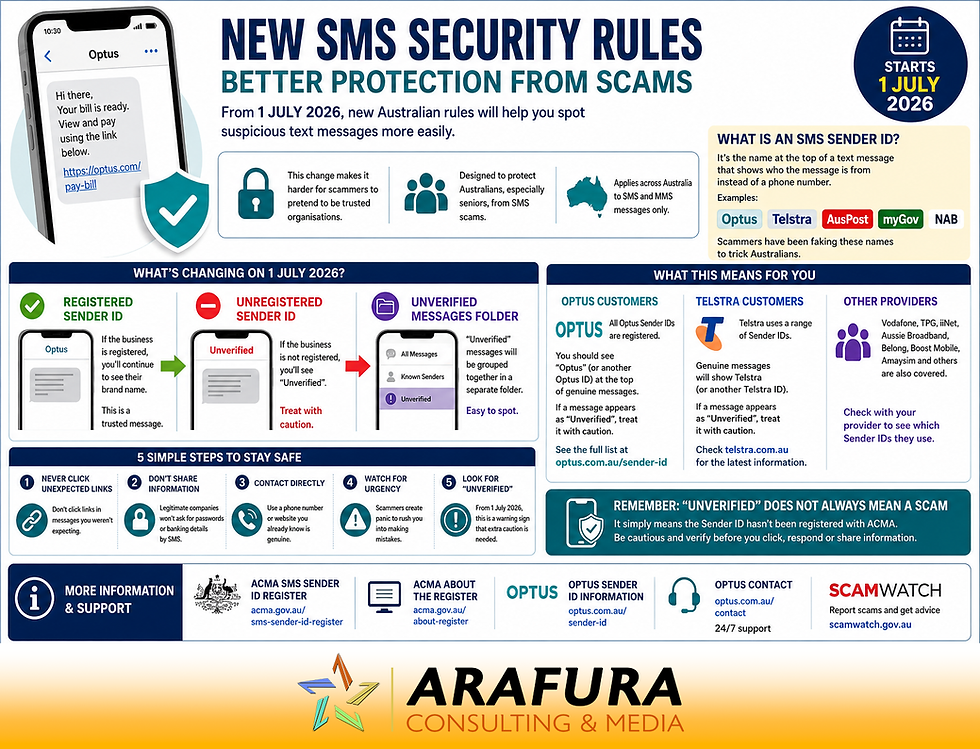
From 1 July 2026, a new anti-scam measure introduced by the Australian Communications and Media Authority (ACMA) will require businesses and organisations to register their SMS Sender IDs. This change is designed to stop scammers impersonating trusted brands such as Optus, Telstra, Australia Post, banks, government agencies and other well-known organisations.
For many Australians, especially seniors who are often targeted by scammers, this is a welcome step forward in the fight against fraud.
What Is an SMS Sender ID?
A Sender ID is the name that appears at the top of a text message instead of a phone number.
For example, you may have received messages from:
Optus
Telstra
AusPost
myGov
NAB
CBA
Instead of showing a mobile number, these messages display a business or organisation name. This makes it easier to identify who the message is from.
Unfortunately, scammers have learned how to abuse this system by impersonating trusted organisations and inserting fake messages into existing message threads. This can make fraudulent messages appear genuine.
According to the ACMA, Australians lost more than $13.8 million to SMS scams during the first nine months of 2025 alone.
What Is Changing on 1 July 2026?
The Australian Government has introduced the SMS Sender ID Register as part of its ongoing Fighting Scams initiative.
From 1 July 2026:
Businesses and organisations must register their Sender IDs.
Registered Sender IDs will continue to display their business name.
Unregistered Sender IDs will be replaced with the word "Unverified".
Messages marked "Unverified" will be grouped together with other unverified messages, including potential scam messages.
This means it will become much easier to identify suspicious text messages at a glance.
What Will Optus Customers See?
Optus has advised customers that all official Optus Sender IDs have already been registered.
When Optus sends a text message, customers should continue to see names such as "Optus" at the top of the message.
If a message claiming to be from Optus instead appears as "Unverified", customers should treat it with caution and independently verify its authenticity before clicking any links or providing personal information.
Optus customers can view the official list of Optus Sender IDs at:
What About Telstra Customers?
While Telstra customers will benefit from the same protections, Telstra uses a range of communication channels and Sender IDs across its services.
Customers who receive text messages claiming to be from Telstra should continue to check that the sender appears legitimate and exercise caution if a message is marked "Unverified".
If you are a Telstra customer, it is worth checking Telstra's website or contacting Telstra directly for the latest information regarding their registered Sender IDs and scam protection measures.
What If I Use Another Mobile Provider?
Customers of Vodafone, TPG, iiNet, Aussie Broadband, Belong, Boost Mobile, Amaysim and other carriers will also be protected by the new system.
However, every provider may use different Sender IDs for different services.
If you receive communications from another carrier, check your provider's website or contact them directly to learn which Sender IDs they use and how they are implementing the new requirements.
What Does "Unverified" Mean?
The word "Unverified" does not automatically mean a message is a scam.
It simply means the Sender ID has not been verified through the new ACMA registration system.
There may be legitimate reasons why a business has not completed registration, particularly during the early stages of implementation.
However, the appearance of "Unverified" should immediately prompt you to be more cautious.
Five Rules for Staying Safe: SMS Scam Protection
Even with these new protections, scammers will continue looking for new ways to trick people.
Whenever you receive a text message:
1. Never Click Unexpected Links
If you were not expecting the message, do not click links until you verify the sender.
2. Don't Provide Personal Information
Legitimate organisations rarely ask for passwords, banking details or verification codes by SMS.
3. Contact the Organisation Directly
Use a phone number or website you already know is genuine rather than details provided in the message.
4. Watch for Urgency
Scammers often create panic by claiming your account has been suspended, a package is waiting, or immediate payment is required.
5. Look for "Unverified"
From 1 July 2026, this new label becomes another warning sign that extra caution is needed.
What About WhatsApp, Facebook Messenger and iMessage?
The new rules apply only to SMS and MMS text messages.
They do not apply to:
WhatsApp
Facebook Messenger
Apple iMessage
Signal
Telegram
Other messaging apps
Scammers will continue using these platforms, so the same safety principles remain important.
A Positive Step for Australian Consumers
The introduction of the SMS Sender ID Register represents one of the biggest changes to SMS scam protection and security in Australia in recent years.
By making it harder for scammers to impersonate trusted organisations, the system should help Australians identify fraudulent messages more easily and reduce the financial losses caused by text message scams.
For seniors, who are frequently targeted by scammers pretending to be banks, telcos and government agencies, this additional layer of protection is particularly welcome.
However, technology alone cannot stop every scam. The best defence remains a healthy level of scepticism, especially whenever a message asks you to click a link, provide information or take urgent action.
Useful Resources
Australian Communications and Media Authority (ACMA) SMS Sender ID Register: https://www.acma.gov.au/sms-sender-id-register
ACMA Information About Sender IDs: https://www.acma.gov.au/about-register
Optus Sender ID Information: https://www.optus.com.au/sender-id
Optus Contact Information: https://www.optus.com.au/contact
Scamwatch: https://www.scamwatch.gov.au
Remember: If in doubt, don't click. Contact the organisation directly using a trusted phone number or website.


Comments