
When a Scam Email Really Does Come From Someone You Know

This is a real-world lesson in phishing, compromised email accounts, and why checking the sender is no longer enough.
Most of us have heard the standard advice about scam emails. Check the sender's address. Look for spelling mistakes. Be suspicious of strange domains. Don't trust emails that obviously don't look right...
That remains useful advice—but it isn't enough, and a recent suspicious email examined by Arafura Consulting & Media demonstrated why.
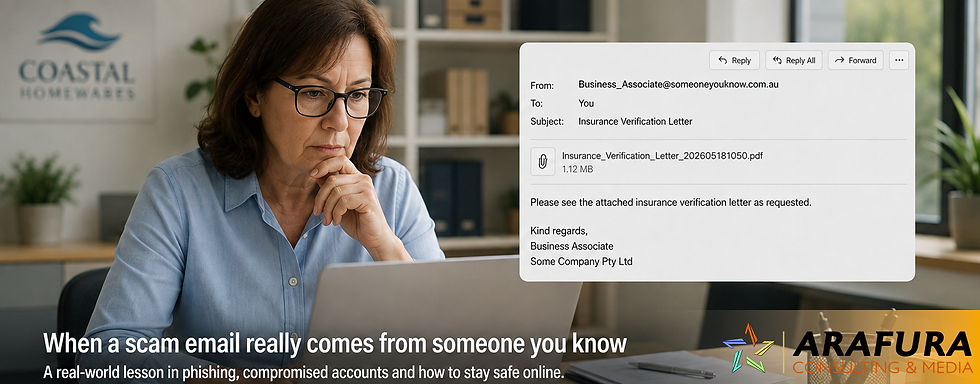
The message appeared to come from a genuine business associate. It came from his normal business email address, contained his normal professional email signature and looked, at first glance, like routine business correspondence.
The email said simply:
“Please see the attached insurance document. Your immediate attention is requested.”
An attachment called an Insurance Verification Letter was included.
There was just one problem.
The attachment was a phishing document.
Even more importantly, our investigation found strong evidence that this wasn't simply a scammer pretending to use the sender's email address. The email had apparently travelled through the genuine business email infrastructure associated with the sender.
This is an important lesson for Australian families and businesses alike:
Sometimes a scam email really can come from someone you know.
Why this Email Looked Convincing
Many people have become quite good at recognising crude phishing emails.
A message supposedly from your bank arrives from a strange Gmail address. The grammar is terrible. The logo looks wrong. The email says your account will be closed in 30 minutes unless you click a suspicious link.
We've discussed those threats here many times, and those scams still exist.
But modern phishing can be much more sophisticated. In this case, the suspicious email contained several things that would normally reassure a recipient.
It had the associate's correct name and business email address. It contained what appeared to be his genuine business signature, including company information, telephone numbers and professional branding.
More importantly, technical examination of the email headers showed that standard email authentication mechanisms had accepted the message.
SPF passed.
DKIM passed.
DMARC passed.
Email systems use these technologies to help determine whether a message is authorised to use a particular domain.
That was an important clue.
It suggested we weren't simply dealing with someone sitting on the other side of the world typing a friend's email address into the From field. The evidence was consistent with the message having been sent through legitimate email infrastructure associated with the business.
That raises a much more serious possibility:
the sender's email account—or something authorised to send through it—may have been compromised.
This type of incident is often described as Business Email Compromise (BEC) or account takeover.
The Australian Signals Directorate's Australian Cyber Security Centre warns that compromised email accounts can expose sensitive information and can also be used to send fraudulent emails to other people.
The First Warning Sign was Surprisingly Simple
Despite all of that technical authenticity, the email itself didn't feel right:
It was generic
There was no explanation of which insurance policy was involved.
No client name.
No policy number.
No renewal date.
No insurer.
No reason an insurance verification document had suddenly been sent.
Instead, there was urgency:
“Your immediate attention is requested.”
Urgency is one of the oldest tools in a scammer's kit because it attempts to make us act before we think.
Scamwatch specifically warns that phishing messages commonly create a sense of urgency and encourage recipients to click links or download attachments.
That observation led to a decision that proved important:
we didn't open the attachment.
What Was Actually Inside the PDF?
The attachment had a .pdf extension. Our first examination confirmed that it really was a PDF rather than, for example, a Windows program disguised with a misleading filename.
But that finding certainly didn't mean this document was safe to open.
Instead, we moved the document to a dedicated computer that provided a safer environment for examining the document and its structure.
One of the first significant discoveries was an embedded web address.
The PDF contained clickable links pointing to an obscure page hosted on Google Sites.
That immediately raised the risk assessment.
There was no obvious reason why an insurance document received from a business associate should send its recipient to an unrelated Google Sites page with a meaningless-looking address.
But things became considerably more interesting when we examined how the PDF had been constructed.
The Document Contained Almost No Meaningful Searchable Text
When we extracted the PDF's text without visually opening the document, essentially the only readable text repeated across its three pages was an irrelevant statement about a “technical document” and intellectual property.
It had nothing to do with insurance.
Yet the PDF contained numerous large images. We therefore extracted those images separately, again, without opening the document and without clicking the links contained in the original PDF.
Those images revealed the deception.
The document contained blurred images designed to resemble genuine business documentation.
Placed over them was a polished graphic carrying Microsoft 365 and SharePoint-style branding.
It said:
Microsoft 365 Protected Document - View Document
To an unsuspecting recipient, the explanation would appear obvious.
The insurance document is blurred because it is “protected”, which silently urges readers to click View Document to see it.
Except that wasn't what the button did.
The clickable area in the PDF directed the browser to the unrelated Google Sites address we had already discovered.
In other words:
What the recipient saw: Microsoft 365 – Protected Document – View Document
Where the link actually went: An unrelated Google Sites page.
At that point, the purpose of the PDF was clear.
It was a phishing document.
Interestingly, the PDF Didn't Appear to Contain a Virus
This is another important lesson.
People often think of a malicious attachment as a file containing a computer virus, but that isn't necessarily how modern phishing works.
Our examination found no obvious PDF JavaScript, executable attachment, automatic launch instruction or conventional malware payload.
Instead, the PDF appeared to have a much simpler job:
Persuade the recipient to click.
The PDF was effectively a bridge between a trusted person's email account and the attacker's next website.
The likely attack looked something like this:
Trusted person's email account→ urgent email→ apparently legitimate PDF→ blurred “protected” document→ fake Microsoft 365 “View Document” button→ external website→ likely next-stage phishing.
We deliberately stopped before visiting the external website because doing so was unnecessary to establish that the attachment was malicious.
The Australian Cyber Security Centre similarly warns businesses that phishing attacks commonly contain links to fake websites designed to encourage people to log in or provide confidential information.
What if We Followed The Link?
We've seen this scam before and already knew what we would find - a webpage designed to look exactly like the one you use to sign into your Microsoft 365 account.
The User is directed to sign into their account to retrieve the "urgent" document, except that isn't what actually happens.
Instead, when the User enters their username and password, they get an error message indicating they entered the wrong password. So the user tries again.
What you cannot see happening in the background is the scammers collecting each username and password. Effectively, the scammers are harvesting account credentials from unsuspecting Users.
Once the scammers have that information, they use it to log into the users genuine Microsoft 365 account and take it over.
This is why the email passed all the regular security checks. It did come from our associate's genuine email account.
Why Google, Microsoft and Other Familiar Names Don't Guarantee Safety
Another potentially confusing aspect of this attack is the use of well-known services.
The document displayed Microsoft 365 and SharePoint-style imagery.
Its external destination used a Google-owned domain.
Neither fact made the communication trustworthy.
Criminals frequently exploit legitimate, trusted online platforms because people recognise and trust those brands.
A web address beginning with a familiar company name can therefore create false reassurance.
The question isn't simply:
“Is this Google?”
The better questions are:
“Why is this person asking me to go here?”
and:
“Does this destination make sense for the transaction I'm conducting?”
An unexpected insurance document that suddenly requires you to visit an unrelated website deserves scrutiny regardless of who operates the hosting platform.
The Most Important Lesson for Seniors: Trust the Situation, Not Just the Name
Older Australians are frequently advised to check who sent an email before acting on it.
That's good advice, but we need to add something to it:
A familiar sender is not proof that a message is safe.
If a criminal gains access to someone's email account, messages can potentially be sent using the person's real address.
They may contain their genuine email signature.
They may be sent to people in their real address book or correspondence history.
The criminal benefits from years of trust that the genuine account holder has built with friends, relatives, customers and business associates.
That makes account compromise particularly dangerous.
Scamwatch advises Australians to verify unexpected communications independently, using contact information they have obtained themselves rather than details supplied in the suspicious message.
So if Margaret, your accountant of 15 years, unexpectedly sends:
“Urgent — please review this document”
don't conclude that it must be safe simply because you recognise Margaret's address.
Telephone Margaret.
Use the telephone number you already have, or find the organisation's number independently.
Ask:
“Did you just send me this?”
That 30-second telephone call can prevent a very costly mistake.
Five Questions to Ask Before Opening an Unexpected Attachment
You don't need to understand SPF, DKIM, PDF objects or computer programming to protect yourself.
Ask yourself:
Was I expecting this?
An unexpected document deserves more caution than something you specifically requested five minutes ago.
Does the message contain enough context?
Genuine business correspondence will often explain what the document concerns. Generic messages such as “Please review the attached document urgently” deserve suspicion.
Is someone trying to rush me?
Urgency is frequently used to suppress careful thinking and should always be considered a red flag.
Does the requested action make sense?
Why would an ordinary PDF suddenly require you to sign into Microsoft 365? Why would an invoice take you to an unrelated website?
Can I verify it independently?
Call the sender using a telephone number you already know.
Scamwatch's broader advice can be reduced to three useful words:
STOP. CHECK. PROTECT.

Advice for Business Owners
For businesses, this incident carries an additional lesson.
Protecting your own computer isn't enough.
Your employees routinely receive email from customers, suppliers, accountants, insurers, subcontractors and other businesses.
Any one of those organisations can suffer an account compromise. That means a perfectly configured email system may still receive a malicious message from a previously trusted correspondent.
Businesses therefore need technical controls and human controls.
Enable multi-factor authentication wherever possible, particularly for email and Microsoft 365 accounts. Use unique passwords, and have a procedure for employees to report suspicious messages without fear of embarrassment.
Staff should also understand that unusual requests require out-of-band verification:
If a supplier unexpectedly changes bank details, telephone them.
If the managing director unexpectedly requests gift cards, telephone them.
If an accountant sends an unexpected login page, telephone them.
If a trusted business associate sends an unexplained attachment marked urgent, telephone them.
And use a number you already know, not the telephone number supplied in the suspicious message.
The Australian Cyber Security Centre specifically recommends separately contacting a known person or business when a message supposedly from them appears suspicious.
If You Clicked the Link
Don't ignore it because you're embarrassed - Act quickly.
If you merely opened a PDF but didn't click anything, the situation may be quite different from entering your password into a website.
If you clicked a link but entered nothing, tell your IT support provider what happened so they can assess the circumstances.
If you entered an email password, Microsoft 365 password, banking information or other credentials, treat those credentials as compromised.
For a business Microsoft 365 account, the response may need to include changing credentials, revoking existing sessions, checking MFA methods, examining mailbox forwarding and rules, reviewing suspicious applications and checking whether the compromised account sent messages to other people.
If financial information is involved, contact your financial institution promptly.
Scamwatch recommends acting quickly following a scam, including contacting financial institutions where appropriate and changing affected passwords.
Microsoft also advises people who receive a suspicious message that appears to be from someone they know to verify it through another method, such as by telephone or text, rather than interacting with the suspicious message.
Don't Be Embarrassed If a Good Phishing Email Fools You
There is a final point worth making, particularly for older Australians.
Modern phishing isn't necessarily badly spelled junk mail sent by an amateur.
Some attacks are specifically engineered to exploit reasonable human behaviour.
You recognise the sender.
The email address is correct.
The signature is correct.
The business is familiar.
The attachment looks professional.
Microsoft's logo appears.
The website is hosted by Google.
Every individual element is intended to lower your suspicion.
Security therefore increasingly depends upon recognising when the situation doesn't make sense, even when the technology looks legitimate.
In the case we examined, one simple question started the entire investigation:
“Why has this person unexpectedly sent me an urgent insurance document?”
That instinct was correct.
You don't need to be a cybersecurity expert to ask the same question.
The Arafura Consulting & Media Rule
At Arafura Consulting & Media, we'd suggest remembering this:
Unexpected + urgent + link or attachment = verify independently before you act.
It doesn't matter whether the message appears to come from Australia Post, Microsoft, your bank, your accountant, your insurer, or even your best friend.
When something doesn't feel right, don't use the link, don't open the attachment and don't reply to the suspicious message to ask whether it is genuine.
Contact the person or organisation independently.
Thirty seconds spent checking can save hours, days, or months of recovery from an account compromise or financial fraud.
For authoritative Australian guidance, see Scamwatch phishing guidance and the Australian Signals Directorate's Small Business Cyber Security Guide.
FAQ:
Can a scam email really come from someone I know?
Yes. If someone's email account is compromised, criminals may be able to send messages using the genuine account. That's why an unexpected request should be independently verified even when you recognise the sender.
Is a PDF attachment safe to open?
Not automatically. PDFs can contain links and other active features. If a PDF arrives unexpectedly, confirm with the sender independently before opening or interacting with it.
How can I check whether an unexpected email is genuine?
Contact the sender using a telephone number or other contact method you already trust. Don't rely solely on contact information or links contained in the suspicious message.
What should a business do if an employee enters their password into a phishing website?
Treat the credentials as potentially compromised and contact IT support immediately. Appropriate response can include changing credentials, revoking sessions, reviewing MFA methods and examining the account for suspicious activity.
What is business email compromise?
Business email compromise involves criminals abusing or impersonating business email accounts to deceive other people, often to steal credentials, information or money. The ACSC provides specific recovery guidance for Australian businesses affected by email compromise.



Comments